CodeTogether AI 2026.10.28 release notes
Release 2026.10.28 widens what is measured and changes what the measurements are attached to. Every AI tool and surface the platform measures is now published as one grid, and cost and progress are reported against the work that was delivered rather than against the branch it sat on. If you administer a deployment, start with Before you upgrade; the coverage grid follows it.
- Release: 2026.10.28
- Deployment: SaaS and on-premises, except where a change names one
- Role: any portal user, except where a change names a role
Red outlines in the figures are annotations that mark what changed. They are not part of the product.
Before you upgrade
Everything else on this page is a change you meet in the portal. These are the five that ask something of you.
- On-premises: upgrade with
helm upgrade --reset-then-reuse-values.--reuse-valuesskips the chart's own defaults, so no request-size policy is rendered and telemetry uploads over a Gateway are rejected as too large. See Upgrade an existing release with--reset-then-reuse-values, and Route traffic through a Gateway instead of an Ingress for what a Gateway route needs from your networking team. - Upgrade the server before the trackers. A tracker from this release holds its work against an older server rather than falling back. See A new tracker needs a server from this release.
- If the developer roster flags a tracker at or below
1.1.3302, reinstall it. Those builds predate self-update, so they never left the version they were installed at and never will. Anything above the floor keeps itself current and needs nothing from you. See Trackers below the self-update floor must be reinstalled. - SaaS: allow
updates.codetogether.combefore your developers update. A proxy or firewall that allowlists hostnames needs it added. See New addresses to allow and to bookmark. - SaaS: re-share the Users tab with anyone holding a bookmark to the old members page. It does not redirect. See On SaaS, Users is the one place people and invitations live.
What CodeTogether AI measures
The AI tools and surfaces that are measured
Coverage is per tool and per surface, and this release is mostly about the surface half. Every row carries the same categories of information - prompt counts, agent turns, tool calls or tool names, token counts, session boundaries, and the model that answered where the tool identifies it - and what differs is whether a figure is reported by the tool or estimated from captured tokens.
| AI tool | Surface | Information used in analysis |
|---|---|---|
| Claude Code | Command line | Prompts, tool calls, tokens and model reported by the tool, helper agents included |
| Claude Code | Claude Desktop | The same, on the desktop surface rather than the command line |
| Codex | Command line | Prompts, tool calls, per-turn tokens and model reported by the tool, helper agents included |
| Copilot | VS Code | Prompts, tool calls, per-request tokens and model reported by the vendor |
| Copilot | JetBrains IDEs | Prompts, tool calls and model; per-turn tokens reported where the vendor reports them, else estimated |
| Copilot | Visual Studio 2026 | Prompt counts, tool calls, per-request tokens and model reported by the vendor, per chat |
| Copilot | Visual Studio 2022 | Prompt counts, tool calls, model and tokens where the vendor reports them |
| Copilot CLI | Command line | Prompts, tool calls and model; tokens reported where the vendor reports them, else estimated |
| Cursor | Cursor editor | Prompts, tool calls, tokens and model per agent response, exact where Cursor reports them, else estimated; work run in the cloud is not included |
| Kiro | Kiro IDE | Prompts, tool names, vendor-reported credits per turn, estimated output tokens |
| Kiro CLI | Command line | Prompts, tool names, model, vendor-reported credits, estimated tokens |
| OpenCode | Command line | Prompts, tool calls, per-message tokens and model reported by the tool, subagents included |
AI cost is an estimate throughout: captured tokens priced at published rates for the model that answered. The one exception is Kiro in the Kiro IDE, priced from the credits Kiro itself reports.
Copilot's inline and next-edit suggestions are not counted as agent sessions and carry no agentic spend.
An AI tool absent from the grid is not measured, and nothing in the portal reports it. What is captured carries the same grid beside what is never collected.
An agent session ends after 30 minutes of quiet
A session is over once 30 minutes pass with no real activity, and work after the gap is a
new session recorded as a resumption of the one it follows. Session counts and average
session length move for every tool as a result, and a session carries no end time any more:
the raw sessions table on a work branch reads Last active rather than Ended.
In-Editor panels count hand-written code and inline assistance
In-Editor tool usage and In-Editor tool adoption count manual coding and inline AI assistance in the editor and leave agent and MCP sessions out, as their tooltips say, so a tool used both ways - Cursor, for instance - reads a different figure in the in-editor pair and the agentic pair. The editor-host list behind In-Editor tool usage also covers Kiro.
Delivery: cost and progress for each piece of work
A piece of delivered work - a pull request, or a sequence of commits pushed together - is the unit this release reports AI cost and progress against. The product calls that unit a work sequence, and the thing cost is reported against a delivery. You say which branches your teams integrate on.
Delivery Tracking names the branches your teams integrate on
Settings has a new area, Delivery Tracking, holding one card: Integration branches. It is where you say which branches your teams integrate on, which decides when work counts as delivered. Work committed on an integration branch counts as mainline work, so pushing it completes the work sequence; work on any other branch counts as delivered when it reaches the default branch.
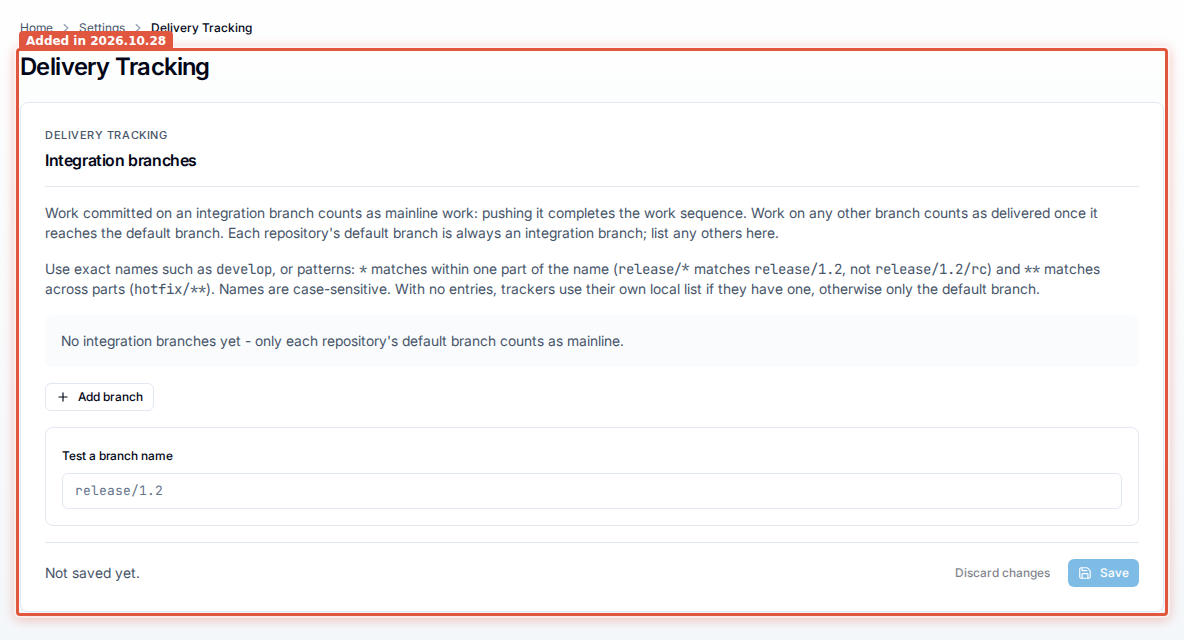
Every repository's default branch is an integration branch already, so the list is for the
others - develop, a release line, a long-lived hotfix prefix. Entries are exact names or
patterns (* within one part of a name, ** across parts, case-sensitive), and Test a
branch name answers for a name before you save. While the list is empty, trackers fall
back to their own local list, or to the default branch alone. Owner and Admin see the area;
nobody else does, and it is the same card on SaaS and on-premises. Saving is recorded in the
audit log as Update integration branches.
Set integration branches is the how-to.
AI spend, against what it delivered
A developer's trace opens its AI cost against what that cost delivered. Up to four tiles - Delivered, Committed, not pushed yet, AI spend not yet tied to a delivery and Total AI spend - each name the number of blocks of AI work behind them, and an AI spend over time chart plots the same states day by day.
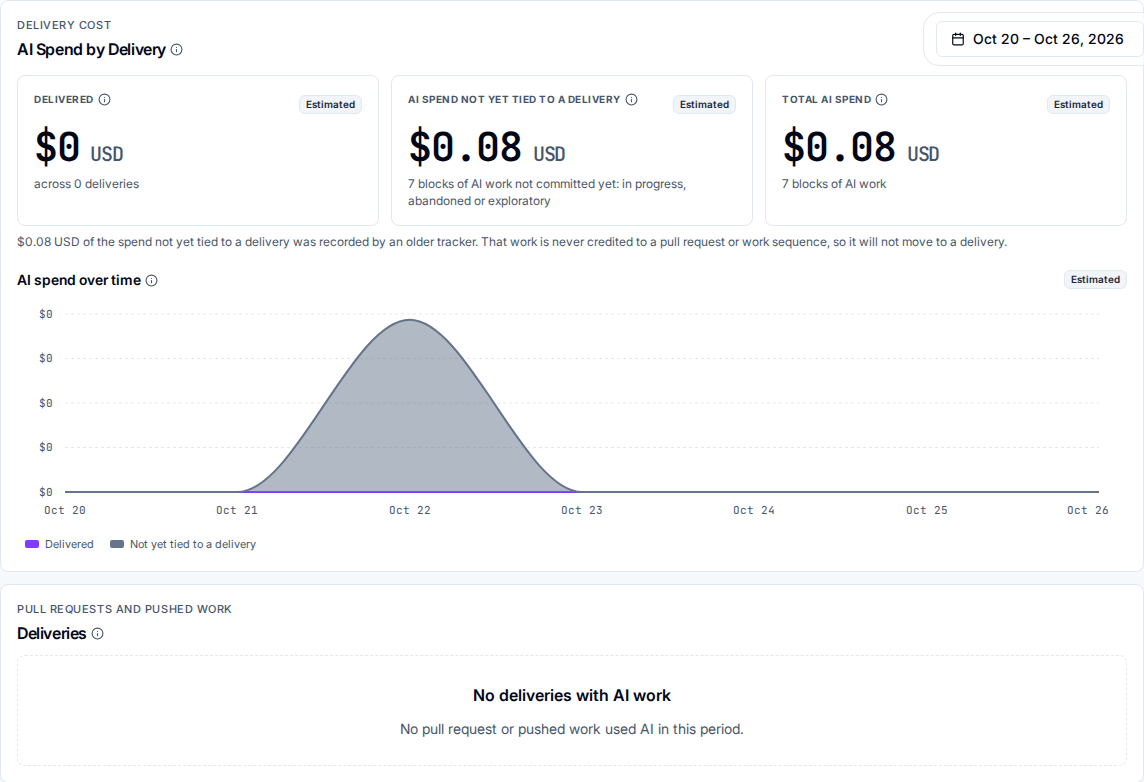
Each AI session's price is split once across the pull requests and work sequences its commits are credited to, so the same dollar is never counted against two deliveries. Spend a tracker reported without a delivery credit is called out under the tiles, because it will never move into one, and work captured by an older tracker is reported separately and is never tied to a delivery.
Under that section, a Deliveries table lists the pull requests and pushed work that used AI in the window, with each delivery's status, its AI cost, the blocks of AI work behind it, and when it was last active. A row expands to the blocks behind that delivery, and selecting one scopes the page to it. With nothing to list the table says so as a measured result, and says separately when the period's analytics are still being prepared.
Deliveries by AI cost on a developer profile
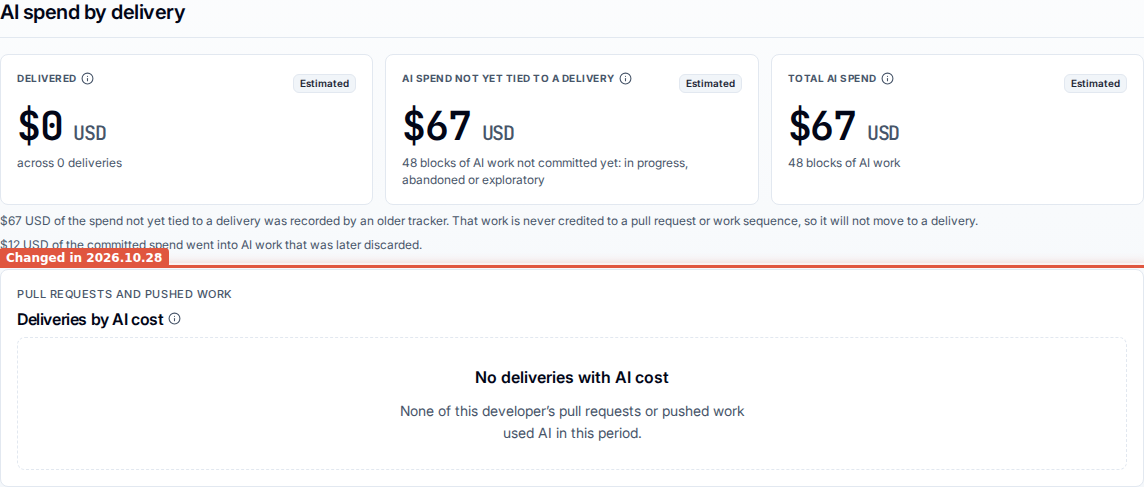
The same read is on a developer profile, between Working with Agentic tools and Change volume: the same delivery-state tiles, and a Deliveries by AI cost card ranking that developer's pull requests and pushed work by what their AI work cost. The profile is five sections rather than four. Notes under the tiles call out spend reported without a delivery credit, and spend that went into AI work later discarded.
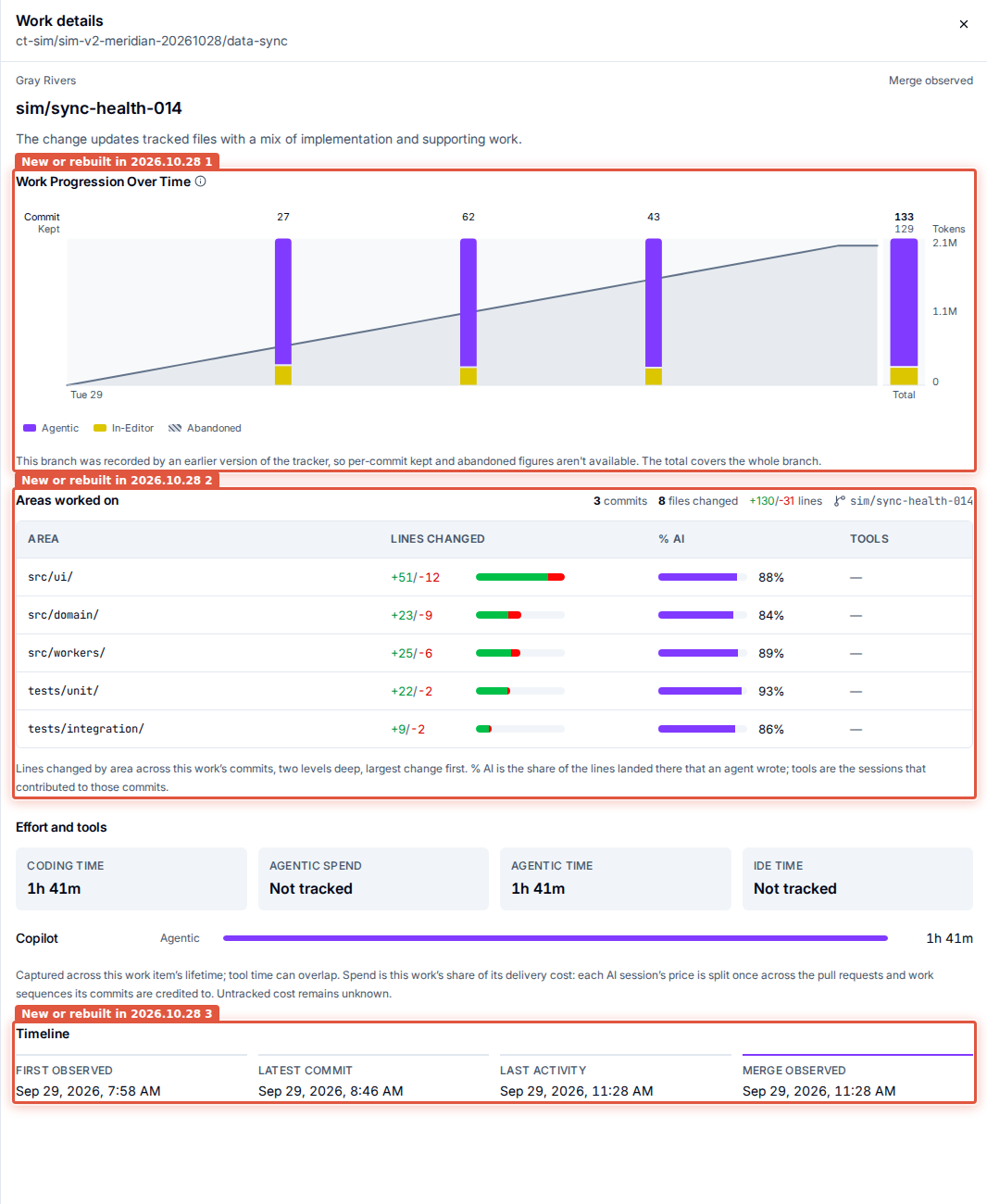
Work Progression Over Time
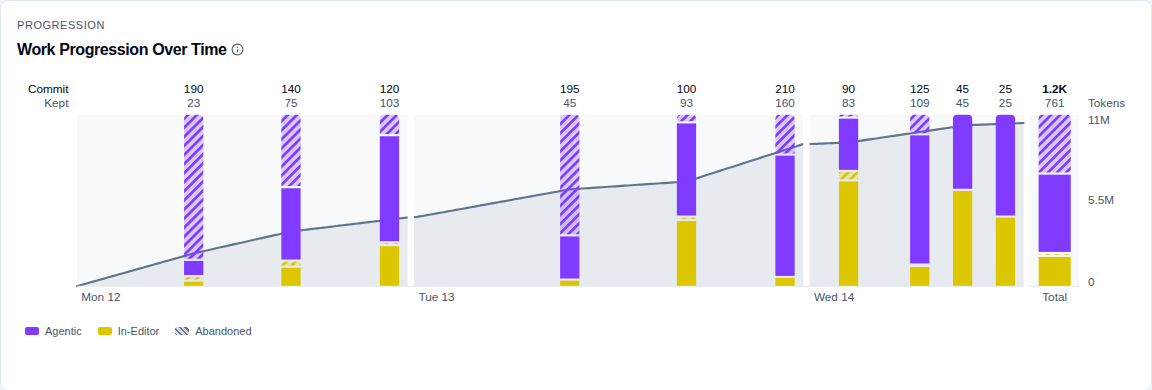
A Work Progression Over Time card shows how one change came together, commit by commit. It sits directly under the branch header on a work branch, and it leads the Work details drawer opened from a Recent work card.
Each commit is one full-height column, split by who wrote the lines it landed: Agentic, In-Editor, and Unknown where neither side can be credited. Within each of those, the part a later commit took out again is striped and sits directly above the part that survived, so work thrown away inside the branch stays visible instead of being netted out of the totals. Two rows of numbers above the columns are keyed Commit - that commit's size, its committed lines plus a tenth of the lines it removed - and Kept, how much of it is still there at the end. A wider Total column on the right carries the same encoding for the whole branch.
The horizontal axis is time spent, not time elapsed. Each day is as wide as the work done in it, with a break drawn between days; idle hours and idle days take no width at all, and a commit sits at the point in that day's work where it was made. Days and times are the developer's own time zone where it is known and the reader's where it is not, and the card says which. A line across the chart tracks the AI tokens used as the branch progressed, on its own scale to the right.
A commit's tooltip gives its short id and title, when it was made, a Committed / Kept at end / Abandoned grid by actor, its size, and the tools behind it. The Total column's tooltip adds the commit count, the branch's abandonment rate, and the agentic share of what was kept. Above 40 commits a two-thumb selector under the chart narrows the view to the most recent 40, and reads which commits those are; the Total always covers every commit on the branch, not the visible range.
Nothing missing is drawn as a zero. A commit made where the tracker was not running is a dashed outline rather than a filled column, and its tooltip says so. A branch recorded by an earlier tracker keeps solid columns, reports per-commit kept and abandoned figures as not yet measured, and carries a note under the chart saying the total covers the whole branch - the Total is measured for every branch, because it comes from the branch's own figures. Where the chart cannot be drawn at all the card reads There isn't enough data to show work progression for this branch. rather than drawing a chart it cannot fill.
The Work details drawer is rebuilt
The drawer opened from a Recent work card is wider and reordered: the progression chart,
then an Areas worked on table (Area, Lines changed, % AI, Tools) giving
lines by directory two levels deep, then Effort and tools, then Timeline as a strip
reading first observed, latest commit, last activity, and merge observed where there is a
merge date. The Code contribution tiles and the
Scope of change section are gone; the areas table and the progression chart cover the same
ground in more detail, and the agentic and in-editor split they carried is on the profile's
Work contribution card.
The agentic spend on a Recent work card and in the drawer is that work's share of its delivery cost, split once across the deliveries its commits are credited to, so no spend is counted twice. Estimated amounts are priced from captured tokens and list prices, missing cost stays unknown, and the figure is not an invoice total. A card's coding time is stated on the shared clock.
How the numbers are measured
AI code share is measured in line equivalents
Every AI-share reading is computed from retained line equivalents - the kept lines each side authored - rather than from Value Points: % of Code from AI on a work area's Flow tab, the Home tab's AI code contribution, % Code from AI on a developer profile, the AI adoption report's AI-authored share and its Agentic % columns, and Flow's Contribution mix. Lines that cannot be attributed to either side are counted on neither.
A work area or a developer with retained lines but no scored Value Points now reports a real percentage instead of a dash. The adoption report's output-share pie is headed Share of output (line equivalents) rather than the tenant's points label, and the work-model panel charts each model's share of retained code. The developer profile's Work contribution card is the one surface still dividing Value Points, so its two modes can differ, which is expected.
Coding time is one measure, everywhere
Coding time on Flow and on Tooling always reports the shared coding-time clock. A deployment that cannot serve the clock shows the tile as unavailable rather than substituting a summed figure under a different name.
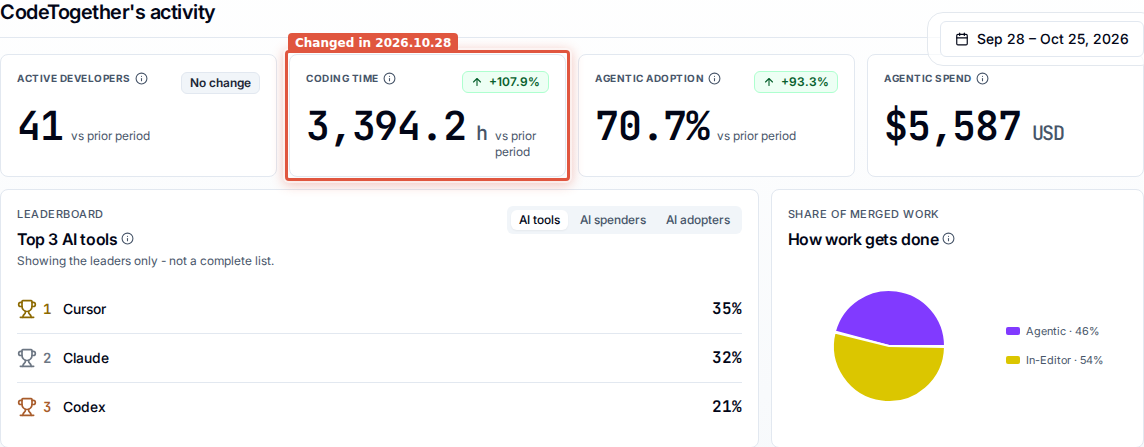
Home's cross-area activity row reports that clock for everything you administer, instead of sending you into one area to read it. The row and its leaderboards are answered as a single scope, so a developer, or a stretch of time, that two of your areas both cover is counted once rather than twice. The Tooling work-area roster's Active time is likewise the sum of that area's per-tool clocks, and a cell the server cannot serve reads a dash instead of a zero.
Active time per session by tool
The Tooling tab's session-length panel is Active time per session by tool, and its definition says plainly what it computes: each tool's active time divided by its sessions - a ratio of two totals, not the length of a typical session.
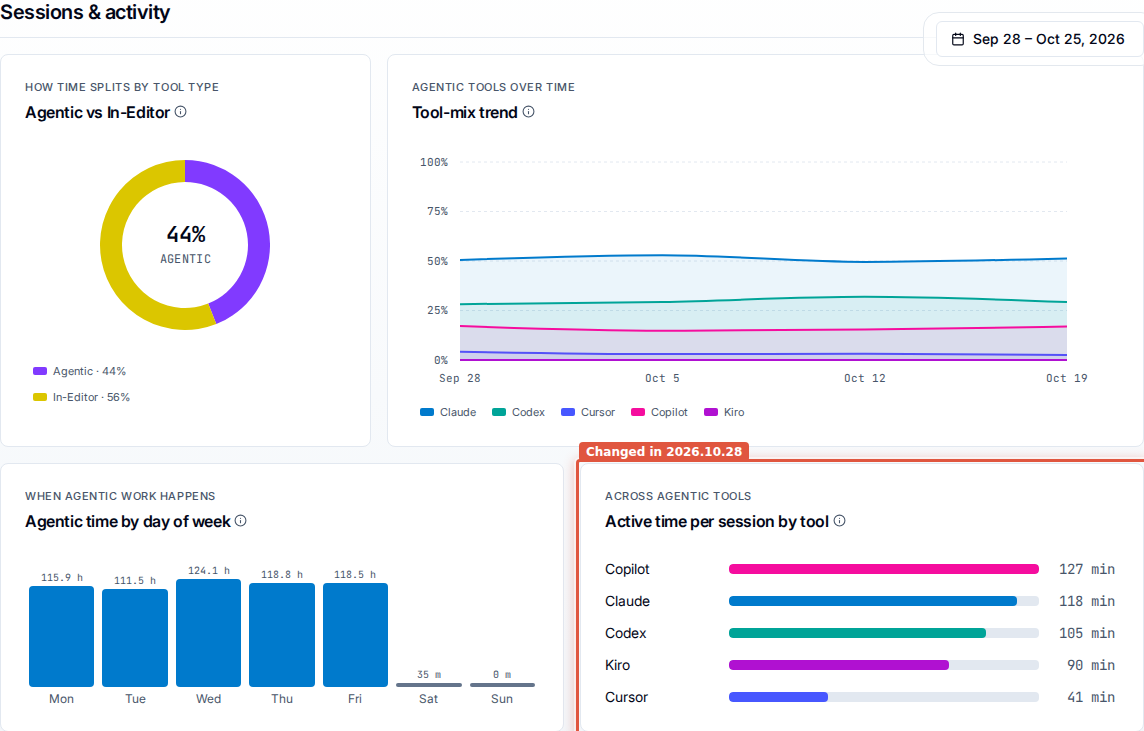
Active time itself is a clock kept per tool, counting each five-minute block of activity once for that tool however many of that tool's sessions were running in it. Two sessions of one tool in one block count once; two different tools in the same block count five minutes each.
Active time and Coding time on Runtime Sessions
The Runtime Sessions Duration column is replaced by two columns that answer different
questions. Active time is the session's own clock - five minutes for each five-minute
block that carried human or agent activity, so a session that was merely open earns nothing.
Coding time is the developer's time in that session, counting an agent block with no
human prompt in the previous 30 minutes at a quarter of a block. A heavily agentic session
therefore reads a lower coding time than active time, which is the measurement working
rather than a discrepancy.
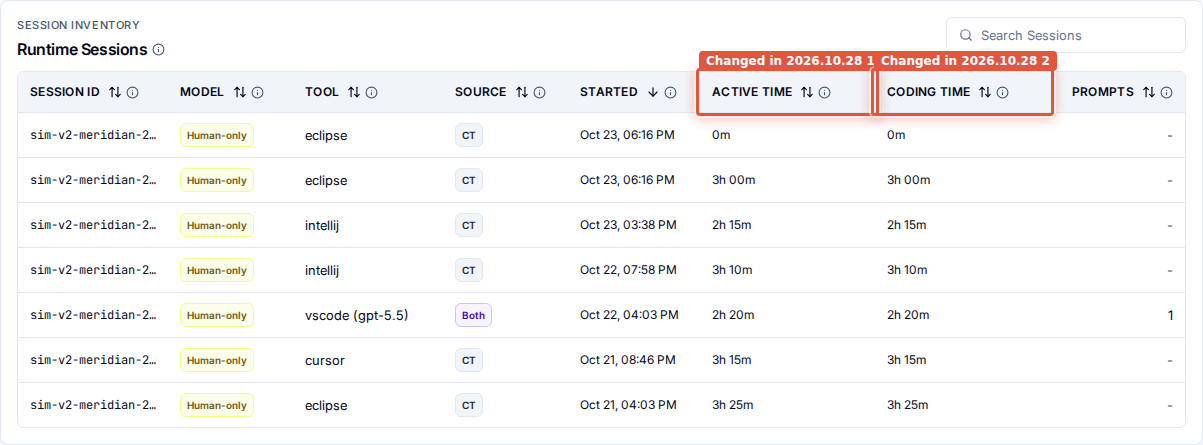
The table is one inline list for every row, with per-row captions for a pending refresh, a session that started before the period, incomplete pricing, and a refresh in progress.
Value points are computed per piece of delivered work
Value points are computed per piece of delivered work rather than per branch. Commits pushed together to an integration branch are one piece of work, not one apiece.
The Value Points column on a Flow roster and on the Tooling team breakdown also states the caps the scoring model applies per developer: human work up to a realistic typing rate, agentic work up to 10,000 lines on a branch and then diminishing, and work with no attributable origin up to 2,000 lines on a branch and then diminishing. The scoring itself is unchanged; the rules are named where the number is read.
Branch active-days counts pieces of work, not branch names
The unit behind Branch active-days is a piece of delivered work, not a git branch name. Two spells of work carried on the same branch name count separately, one git branch can contribute several branch-days in a single day, and pushing a branch does not on its own finish the work it carries.
AI cost is priced net of cached tokens
The Agentic spend tooltips on Flow, on Home and on the AI adoption report state the scope: the cost of all captured AI usage, in-editor assistants included, shown as estimated where provider-billed cost is not available and the figure is priced from captured tokens.
Copilot and the Codex CLI report prompt tokens with cached tokens already included, so the stored token figure for both is net of cache and their captured sessions are re-priced on that basis - their token counts and cost read lower than they did before this release. Cursor is unaffected. The per-tool token figure counts input tokens only, on the same basis, and budget utilization counts input and output together against an unchanged quota - so a developer working mainly in those two tools reads a lower utilization than their raw token traffic would suggest, because the netting lands on the input side. The formula is unchanged.
The built-in rate card carries each vendor's published cache-read and cache-write rates, and affected history is re-priced against them. The direction differs per model: some cached tokens drop to a fraction of the input rate, while a model priced from a generic family rate moves to its own published rate. A conversation that reports a running total in more than one block is priced once.
Costs say how certain they are
Three markers qualify a cost where the surface knows how the figure was arrived at: ℮ for
an amount priced from tokens and list prices rather than reported by the vendor, May still
change where the work behind it is unfinished, and Partial: may read short where the
cost reaches back to days it is not fully built for yet, so the figure can read low until
the analytics catch up. A cost below a cent reads <$0.01 rather than $0.00.
Waste cost is an allocated figure - each session's price spread over the AI work it
generated, with waste the cost of what was discarded there - and it reads Unavailable
rather than $0 when no discarded work carries a price.
Smaller changes on the numbers
- A share whose movement against the prior period rounds to zero reads No change rather
than
0 pts. - A Flow tile withheld because the period is below its reliability baseline shows a dash under its overlay and hides its trend badge, comparison label and sparkline, rather than printing a number it is not standing behind.
- Where the tracker could only take a whole-file diff there is no line count to cap a
conversion against, so that work reports zero lines added, zero deleted and zero files
changed while its retained output is non-zero and uncapped. A piece of work reading
0 lines changedbeside real retained output is that case, not a fault. - Per-tool minutes are answered from a source that keeps 90 days, so in a work area scoped to repositories a window older than that shows no tool minutes.
- An IDE session with no model reads a dash.
Dashboards
Last 2 weeks, and the Activity tab reads Last 4 weeks
Every report's date picker offers a Last 2 weeks quick pick - two whole Monday-to-Sunday weeks - including on the AI adoption report and the trace views, and it appears where the scope has at least 14 days of history. On the trace views it sits between Last week and Last 4 weeks; on the reports, which do not offer Last week, it is the first quick pick. The Activity tab describes its own whole-weeks window the way the other dashboards do, Last 4 weeks rather than a day count, so the subtitles across the tab strip agree with each other. A span that is not whole weeks still reads in days.
Report windows are your own days, in your own time zone
A report or trace window is built from the reader's local calendar days and sent with the browser's time zone, rather than from UTC days or a zone fixed at deployment. A last-7-days figure covers the reader's last seven local days, and a window opened from a report keeps the day it was given, so a day's activity stays on the day it happened for readers either side of UTC. Two people in different zones reading the same quick pick are reading slightly different days, and their figures differ accordingly.
This applies on SaaS and on-premises. The deployment time-zone setting is gone. It was an environment variable read when the portal was built, never a chart value, and anything still set for it is ignored.
Sort work areas
Your work areas on Home carries a Sort work areas control. Alongside Name A–Z and Name Z–A it offers Highest AI spend, Lowest AI spend, Most active developers and Fewest active developers, and areas with no measured value sort last whichever you pick. It opens on Name A–Z.
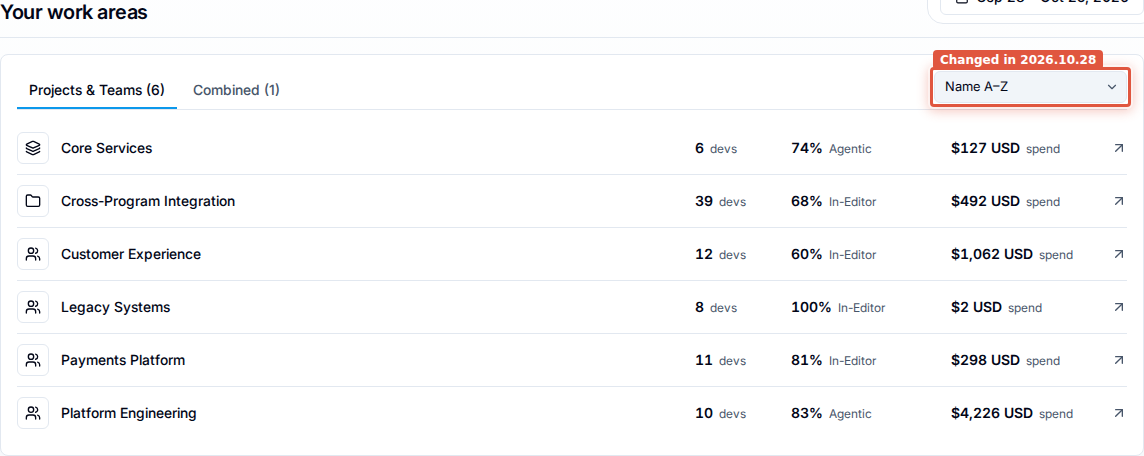
The list holds only the areas whose aggregate dashboards you can read, so an area you reach through a Self Only grant alone no longer appears in it.
Sort rows in Where the team worked
The Activity tab's Where the team worked grid can be ordered by Most hours, Fewest hours, Name A–Z or Name Z–A. Grouped folders and rows from older tracking stay at the end whichever order you choose.
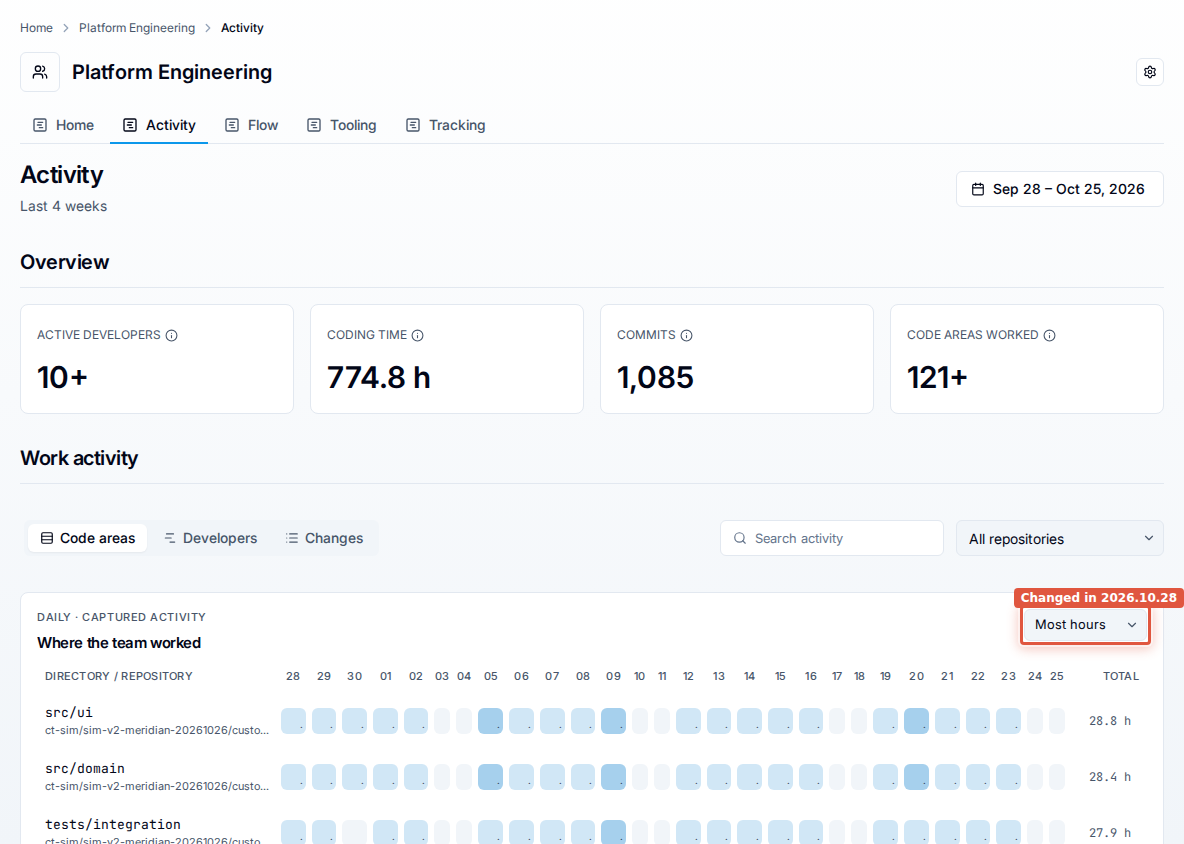
Where the grid holds more rows than it shows, the rows shown are still the ones with the most captured time - sorting reorders what is on screen rather than pulling a new row into it.
Work Areas Breakdown no longer holds back small teams
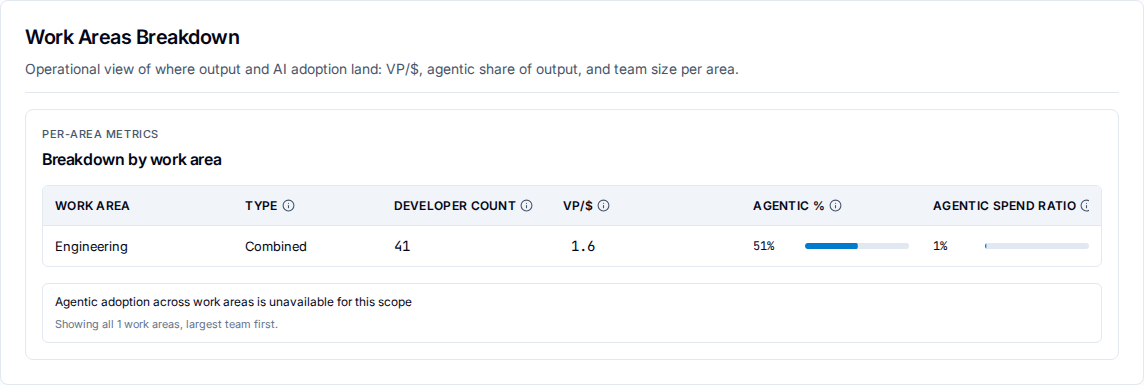
The AI adoption report's Work Areas Breakdown lists the work areas in the scope, largest team first, and its footer says how many: Showing all N work areas, largest team first. Areas with fewer than three active developers are no longer held back, so an organization whose areas are mostly small teams will see rows here for the first time. The list is narrowed before it is ordered: where the account has any Combined work area, the Combined areas are the ones listed, and an area with no available developer count is left out. The section description drops its closing sentence about smaller organizations seeing only their significant areas.
A panel that cannot be served says so
When the server is shedding work because it is computing company-wide figures for other requests, a Tooling tile reads Temporarily unavailable with a Try again button, and a panel reads Tool activity temporarily unavailable or Tool adoption temporarily unavailable with the same button and a line saying the server was busy computing company-wide figures for other requests and that this does not mean there is no data. A roster read that fails replaces the table with Developers unavailable and an invitation to try again, instead of an empty table reporting a total of zero.
Where the deployment cannot serve Flow's When the team works heatmap, the panel shows an unavailable silhouette and says that activity for this period cannot be shown and that this is not a report of zero activity. Coming soon is reserved for a metric that is genuinely not wired up yet.
A developer's email, on the roster and on the profile
Administrators can tell two similar names apart from the roster itself: pointing at a developer's name on Flow, Tooling, Activity or Tracking, or reaching it with the keyboard, shows the email address the work was captured under. It is suppressed where it would merely repeat the label. A developer profile's subtitle reads that address and then the period on one line, with a long address truncated and shown in full on hover.
Smaller changes on the dashboards
- The Developer Tracking roster is paged against the whole population rather than a
capped first fetch, so the pager counts everyone in scope -
1–10 of 2,115- thousands-separates the total, and every page of a large organization is reachable. - Open all activity on a profile carries that profile's days through unchanged, so Recent changes reports the same window, and a scope whose first activity is today loads.
- A developer with no activity in the window is titled from the subject directory rather than from their email address.
- A work-branch card with no repository name shows the short repository id, and omits the repository segment entirely when the repository is genuinely unknown.
What has gone
Work segments have left the vocabulary
Work segments are no longer a stage anyone sees. The Work Segments tab is gone from a
work branch's Raw Troubleshooting Data, along with its Segment ID, Session, Kind,
Start, Minutes, Prompts and Cost columns and its search box; the Segs and
Segments columns are gone from Runtime Sessions; the Work segments tile is gone;
and the glossary's description of the pipeline follows.
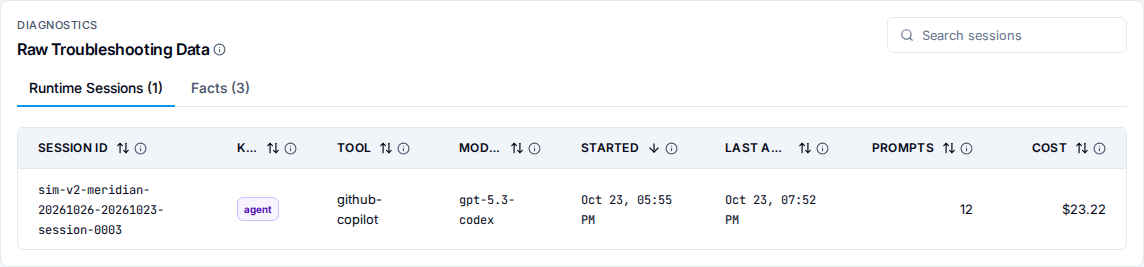
Pipeline Throughput no longer draws a segments stage, so the bar runs from commits to analysis facts.

Nothing that fed a reported number has been lost, and nothing replaces segments one for one: they were an intermediate layer between raw ingest and analysis facts. The per-session time they hinted at is read directly on Runtime Sessions as Active time and Coding time, and the per-commit view of a branch that segments never gave you is Work Progression Over Time.
The Total time tile is gone from a developer trace
The Developer Activity Stream summary no longer carries a Total time tile. Coding
time, Engaged and Unattended agent are always rendered instead, and a clock the
analytics have not built yet shows a gap rather than a stand-in number. The tile set is
Runtime sessions, Commits, Branches active, Coding time, Engaged,
Unattended agent, Cost (USD), Tokens, Lines changed, AI prompts and
Capture coverage.
Flow's Team Pulse and the Tooling strip no longer fall back to a Total coding time tile
with a definition of its own either; see Coding time is one measure,
everywhere.
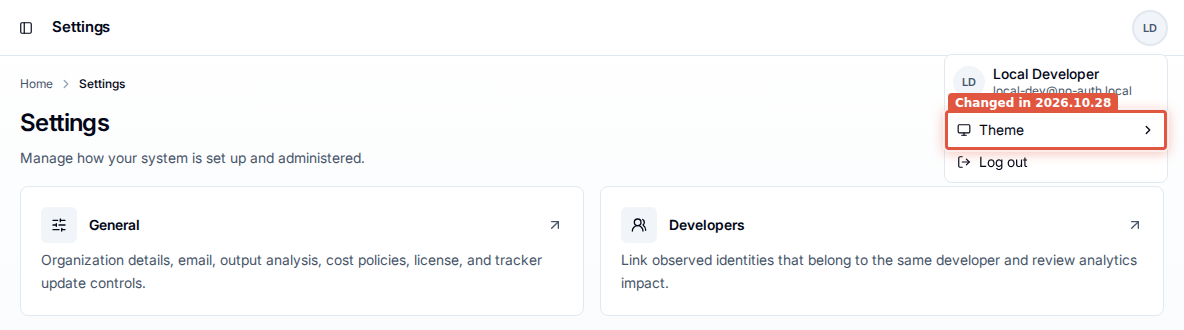
The theme control has left the top bar
The three-segment theme control is gone from the top bar. The choice lives in a Theme submenu in the avatar menu, above Log out, offering System settings, Light mode and Dark mode. Nothing about the themes themselves changed, and the top bar is quieter for it.
Access and administration
Flow and Tooling open for a Viewer on a Combined work area
A Viewer opening Flow or Tooling on a Combined work area gets the page, which is the access the Viewer role has always been documented to give. Its work area breakdown lists the child areas that Viewer can open, and is empty where there are none.
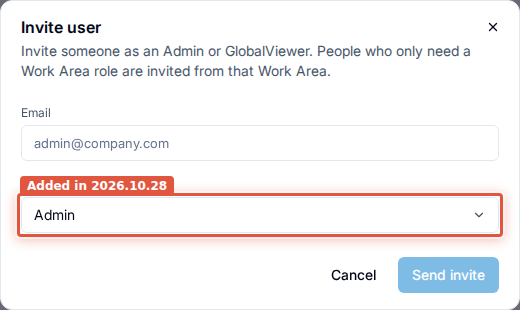
Invite someone as an Admin or a GlobalViewer
The invite button on Settings > Access > Users reads Invite, and its dialog, Invite user, carries a required System role field offering Admin and GlobalViewer.
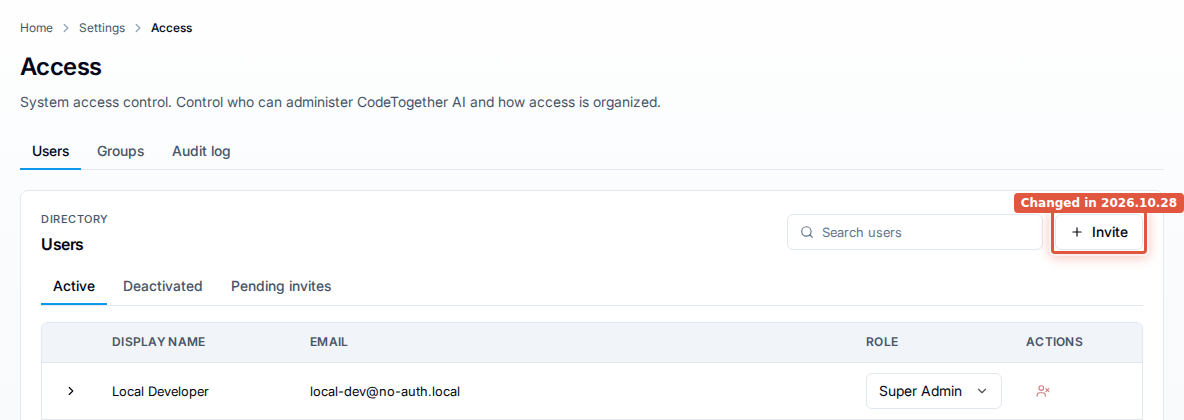
The button read Invite Admin on both deployments, and every invite it sent carried Admin. On SaaS the Members & invitations tab offered the other roles; on-premises there was no such surface, so a read-only auditor had to be invited as an Admin and demoted afterwards. The address field and the table column read Email, on both deployments.
Pending invites carry Resend, Copy link and Revoke
Every pending invite carries its own actions as labelled buttons: Resend on an invite addressed to one person, which answers "Invitation resent."; Copy link on a SaaS link invite; and Revoke on either, which asks first and states that the link stops working. The Status column is gone - an invite leaves the list the moment it is accepted, revoked or expires, so being listed is the status.
The expiry date reads Oct 26, 2026 rather than 10/26/2026, a link invite's redemptions
read (used 3 of 10 times), the GlobalViewer role reads Global viewer on these
rows, and an empty list says so in the table itself: "No pending invites." or "No pending
invites match your search."
On SaaS, Users is the one place people and invitations live
Settings > Access is Users, Groups and Audit log. The Members & invitations tab is gone, folded into Users, which is the single place people and invitations are managed: named invites, shareable-link invites, pending invites, resend and revoke. A bookmark of the old members address does not redirect, so it is worth re-sharing the Users tab with anyone who kept one. Where an identity provider owns your directory, Users renders its invitation half instead of a notice that user management happens elsewhere.
Linking identities asks how far back to recalculate
Confirming an identity link on Settings > Developers offers four histories, and the recommended one is From the selected identities' earliest activity: it recalculates from the earliest activity known for any identity in the link, and activity reported later that is older than that stays with its separate identity. From confirmation onward states plainly that earlier sessions stay with their current developer in reports and in the Developer Trace, From a specific transfer date says that activity before the date stays with the previous developer, and All retained history presents all available activity as one developer.
The audit log says what happened in words
Entries read as sentences rather than as mechanically split identifiers: Work Area Child Add is Add child work area, Developer Identity Link Confirm is Link developer
identities, Install Token Revoke is Revoke install token, Scope Pattern Add is
Add collection scope pattern, and the same for the rest. Activity types follow:
Support bundle, Developer identity, Merge candidate, Collection scope
pattern, Cost policy, and the release's own addition, Integration branches.
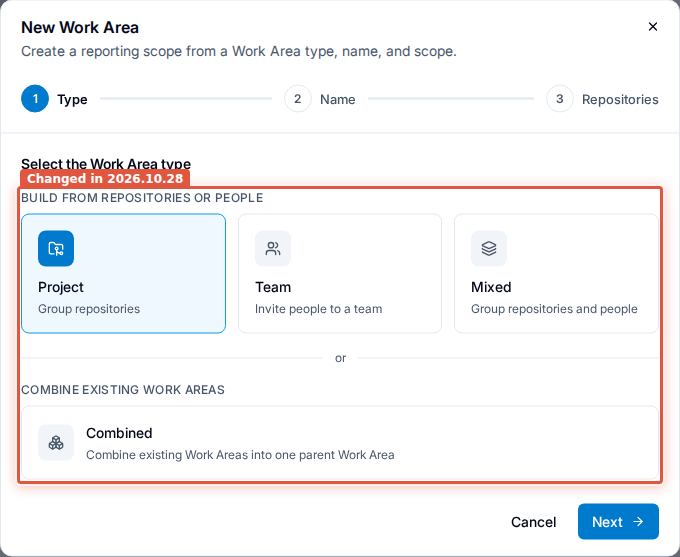
Creating a work area: the types are grouped by where coverage comes from
Step 1 of the New Work Area dialog groups the types rather than laying out four equal cards. Project, Team and Mixed sit under Build from repositories or people, captioned Group repositories, Invite people to a team, and Group repositories and people. Below an or divider, Combined sits under Combine existing Work Areas, captioned Combine existing Work Areas into one parent Work Area.
The refreshing-data notice appears only where it applies
The notice "We are refreshing your data. Some numbers may be incomplete until this finishes." appears for a full refresh everywhere, and for a routine refresh only on a page whose date window that refresh rewrites. On-premises, Settings > Data / Maintenance leads with a banner titled Analytics rebuild in progress, which names the operation it is running - Rebuilding all analytics, Upgrading analytics history (step 43 of 55), or Routine analytics update where the ordinary refresh is all that is in flight. The Analytics status card sits below it, carrying a badge - Caught up, Working or Needs attention - a sentence giving the reason, and a three-item checklist.
Smaller changes on access and administration
- Expanding a row on the Deactivated tab shows that person's work area and group memberships for reading only; the forms that granted them read "Reactivate this user to grant Work Area or group access." Grants are made after the person accepts a reactivation invite.
- The Settings landing introduces itself in one line - "Manage how your system is set up and administered." on-premises, "Manage how your organization is set up and administered." on SaaS - in place of its Settings areas heading.
- Dialog and drawer titles carry a plain colon, so a provider's configuration dialog reads
OpenAI: Configurationand a work area's reads<Work Area>: Details. - Empty tables say what they are empty of, in the table: "No groups yet.", "No groups match your search.", "No members yet."
- On-premises, Support bundles on Settings > Data / Maintenance lists the bundles
generated on the install rather than only your own, with a Created by column and a line
stating how many are kept -
Only the most recent ready bundle is kept and can be downloaded., orUp to N ready bundles are kept and can be downloaded.where more are. Each row carries a download and a delete icon, and the list carries Delete all. The tab keeps its Generate support bundle label. - On SaaS, every role has a Documentation link at the foot of the portal sidebar, which opens this site in a new tab, and Contact support in the profile menu, which opens a message to the CodeTogether support address. Neither is on the on-premises sidebar.
- Every invitation email ends with a paragraph and a link to workstation setup, so an invited developer is told the next step. The subject and the Accept invite action are unchanged.
- Seats counts your own people: CodeTogether support staff are not counted, and the billing page and the out-of-seats notice read the same count.
Starting on SaaS
Confirm your email to start your trial
A trial workspace is created for a confirmed email address, so a signup with an email address and password stops at Confirm your email to start your trial instead of opening the portal. The details entered are saved, nothing is created yet, and the notice carries Resend verification email and Use a different account; confirming the address resubmits the signup on its own and the workspace is created. A confirmation link opened while a trial is waiting lands on a page whose button reads Set up your workspace. Sign-ups with Google are confirmed already and never see any of this.
You're on the waitlist
New trials are released gradually, so a signup can be held rather than fulfilled. The person sees You're on the waitlist - details saved, a workspace expected in about two weeks, an email when it is ready - and signing in again before then returns to the same screen rather than to the trial form or to an empty portal. When the hold is released the workspace is built from the details already entered, asking again only for current terms.
Start a free trial without leaving the portal
Someone signed in to an account that belongs to no organization reads No organizations yet and is always offered Start a free trial, which opens a trial form inside the portal rather than sending them back to the website for a second sign-in. The form asks for Company name, Workspace name, a Data center region where more than one is offered, and I agree to the terms of service; its button is Create workspace, and the workspace opens with the session already in the browser.
Install from your IDE's marketplace
Each IDE tab of Set up your workstation carries an Install steps box with a Marketplace / Manual install control, and it opens on Marketplace wherever the IDE's marketplace lists the extension. The extension is published publicly as CodeTogether AITrax Cloud: on the VS Code-based IDEs tab, Open in VS Code hands it to the editor, while Cursor and other VS Code-based editors search their Extensions view for it; JetBrains and Visual Studio link their listing and give the in-IDE search path. Eclipse has no marketplace listing, so its tab says so and opens on Manual install - Eclipse's update site from the server - which is also where the page opens for any other IDE the extension is not listed for yet.
Home says what an unfinished GitHub connection needs
Step 1 of the setup guide names what is unfinished about a GitHub installation instead of leaving the step amber: GitHub setup isn't finished when a connection exists but no installation is live, No repositories are shared with the GitHub App when it is installed but sees nothing, GitHub connection needs attention when it is installed but not working, and Syncing your GitHub repositories while GitHub is still being read, which finishes by itself. Each carries the action that resolves it - Finish setup in Settings, Choose repositories in Settings, Fix it in Settings, View progress in Settings - and an aside for someone who cannot administer GitHub themselves: invite someone who can as an Admin. Where nothing is connected at all, the step offers the two ways to connect instead.
Billing is one page, with every plan side by side
Settings > Billing is rebuilt around a Compare plans card, under the eyebrow Plans, which lists every plan the portal sells with its price, how it bills, and what it includes. Each plan carries its own action - Upgrade to Company, Downgrade to Essential - in place of the two direction buttons, so any plan is one change away and the control says where it goes. A downgrade reports your usage against the plan you would move to before you select it, and a switch to or from Company is made in the portal behind a confirmation that quotes what it charges today. A subscription set to end reads Ends <date> rather than Renews <date>, with a banner saying how to keep it.
The whole screen, including what it reads during a trial, after one, when a payment was not collected and after a cancellation, is documented in Manage your subscription and billing.
New addresses to allow and to bookmark
The SaaS portal is at app.codetogether.com, and sign-in goes through
auth.app.codetogether.com. Allow both.
Plugin and tracker downloads are served from https://updates.codetogether.com. The tracker
and the Eclipse update site reach it by redirect through the backend, while the VS Code,
IntelliJ and Visual Studio plugins fetch it directly, so either way a proxy or firewall that
allowlists hostnames needs that one added before your developers update. On-premises is
unaffected: an on-premises server serves tracker files itself.
Smaller changes on SaaS
- Settings > Activity Tracking opens straight onto the repository list, under "Choose which repositories have their activity tracked.", instead of a tab strip with one tab in it. Existing deep links to the repositories view still work.
- For someone who can set up repositories, the portal's Onboarding page asks for Generate activation code until the organization has one, then carries both audiences: the shareable Setup link and Activation code tabs, and the per-IDE install steps for whoever is setting up the machine they are signed in on. A developer who cannot gets Set up your workstation instead: one Set up this workstation card and a code field.
- Three billing emails reach every active Owner - a payment that could not be collected, billing back in good standing, and a cancelled subscription - each naming your organization in the subject and carrying an Open Billing settings action.
- The password reset message is branded, with the subject
Your CodeTogether AI password reset code. - The verification and trial emails were rewritten, with their subjects unchanged:
verification explains why confirming matters and warns about phishing, the trial-ended
email names the actual end date, and both point at
support@codetogether.comrather than inviting a reply to a no-reply address. - The trial-welcome and first-data emails are no longer sent.
On-premises deployment and the tracker
Route traffic through a Gateway instead of an Ingress
The chart can attach an HTTPRoute to a Gateway you already run - for a cluster that routes
with Gateway API, such as one running NGINX Gateway Fabric - instead of creating an Ingress.
Set gateway.enabled=true with gateway.parentRefs naming the Gateway's name, namespace
and listener, and ingress.enabled=false. The chart creates no Gateway, listener or
certificate, so TLS terminates at a listener that already serves your hostname. On NGINX
Gateway Fabric it renders a ClientSettingsPolicy carrying
gateway.nginxGatewayFabric.clientSettingsPolicy.bodyMaxSize (16m by default), because
telemetry uploads are larger than a gateway's usual 1 MB request limit and would otherwise
be rejected; on any other implementation you set that limit yourself.
Three values work only through the ingress-nginx Ingress - ingress.denySourceRanges,
clientIp.realIpFrom and telemetryMirror - so an install that sets any of them with
gateway.enabled=true and ingress.enabled=false stops and names them rather than quietly
dropping them. What you need from the networking team changes with the route: an ingress
class name on the Ingress path, and a Gateway name, namespace and listener name on the
Gateway path.
Upgrade an existing release with --reset-then-reuse-values
Use helm upgrade --reset-then-reuse-values on an existing release. With --reuse-values,
Helm keeps the previous release's values and skips the chart's own defaults, so no
request-size policy is rendered and telemetry uploads over a Gateway are rejected as too
large.
Raw capture data is kept until you say otherwise
An on-premises deployment keeps the raw data workstations upload for as long as the
deployment lives, so database storage grows with captured activity. Set
CTAI_INGEST_TRACKER_RAW_RETENTION to an ISO-8601 duration such as P90D, through the
chart's extraEnvVars, to prune older weeks; left unset - or set to none, forever or
keep - every week is kept. Size the database for the retention you choose.
A new tracker needs a server from this release
A tracker from this release reports through a new upload pipeline with no fallback to the
previous one, so against an older server it holds its work and aitrax health says why.
There is no numeric minimum server version, and an older tracker against a newer server
still works.
aitrax health reports on capture, not just on the lifecycle
Every run ends with a capture report: a row per capture source with the share of sessions
captured incompletely, and the state of the tracker's uploads. A capture share above the
threshold it names reads DEGRADED and lowers an otherwise healthy verdict, so a
workstation can report degraded for a reason that is about capture quality rather than
about anything failing.
Three flags come with it: --sessions lists the individual sessions behind the capture
report, --quarantine[=WORKTREE] replaces it with one worktree's commit-delivery
quarantine, and --path DIR reads an offline bundle copied off another workstation rather
than the running tracker.
Trackers below the self-update floor must be reinstalled
There is now a stated floor for self-updating trackers: 1.1.3302, inclusive. Builds at or
below it were cut before trackers could update themselves, so they carry no self-update at
all: they stay on whatever version they were installed at, however many releases pass, and
have to be reinstalled or upgraded by hand. That is why a fleet can still be several versions
back while every tracker above the floor has kept itself current. aitrax health warns about
it on the workstation, and the developer roster shows the matching warning, so you do not have
to go looking.
Smaller changes on-premises and on the tracker
- Power-user days are counted from prompts and tool calls.
- Every AITrax IDE plugin ships the CodeTogether Terms of Service as its license, which is
what the IDE shows at install; the Eclipse feature's license link is
https://codetogether.com/terms. This applies on both deployments.
Behind the scenes: reliability and performance
None of these change a screen. They change whether a screen answers, and how quickly.
- Analytics builds scale with the amount of work recorded rather than with the square of it, so organization-wide and team-wide views, developer traces and the developer roster load on the largest accounts instead of slowing down as an account grows.
- Where several organizations share a deployment, each gets its own turn: one organization's heavy rebuild no longer holds up anyone else's dashboards, and newly arriving activity is refreshed ahead of background recalculation.
- Figures keep moving while data keeps arriving. A record the service cannot accept is set aside and reported rather than retried forever, and the conditions that could once stall an account's numbers - including a commit made with no branch checked out, an identity change part-way through a catch-up, and a repository recognised under a second address - no longer do.
- One person who committed under two spellings of the same address is one developer again on work and contribution records, rather than two rows splitting their figures.
- Work captured while nothing was watching is picked up next time, one very large or slow repository no longer holds up the others, and no work is counted twice.
- The Linux tracker's binaries are statically linked, so the system-library floor that stopped them starting on older enterprise distributions is gone.