Set capacity assumptions
Use this guide to set the capacity assumptions CodeTogether AI reports read when they describe delivered output against a team's schedule. You'll update the current values, choose when the change takes effect, and confirm how it reaches your reports.
- Deployment: SaaS, On-premises
- Role: Owner, Admin
Before you begin
To set capacity assumptions, you need:
- Owner or Admin on the organization: Editing tenant settings requires one of these roles. See Roles reference.
About capacity assumptions
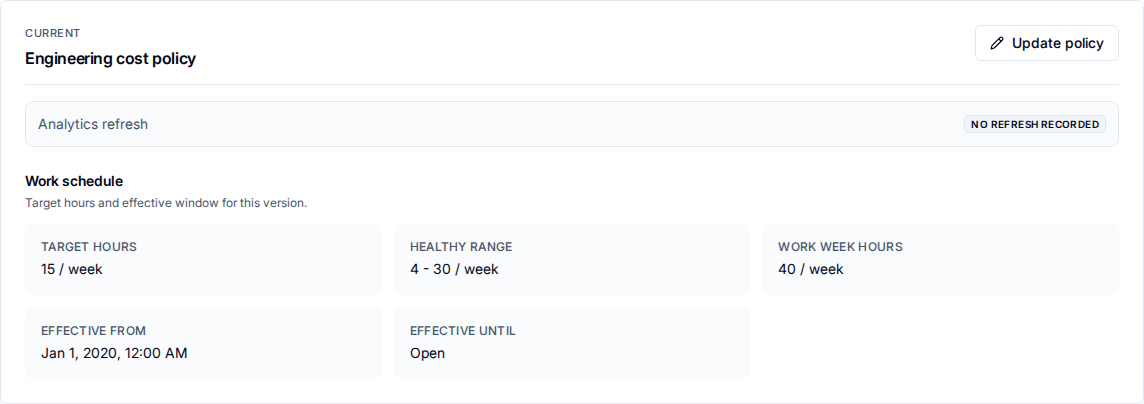
A cost policy version at Settings > General > Cost Policies records the following. The first column is the name the current policy card shows; where the edit dialog names a field differently, its label follows.
| Setting | What it sets |
|---|---|
| Target hours, as Target active hours / week | The active engineering hours per week a report compares delivered output against. |
| Healthy range, as Healthy lower hours / week and Healthy upper hours / week | The lower and upper weekly hours that reports treat as a healthy level of activity. |
| Work week hours | The full scheduled work week, used as the base for capacity and utilization figures. |
| Effective from | The date this version starts applying to reports. |
| Effective until | Read-only. The date this version stops applying, set when a later version starts, and Open for the current version. |
The work schedule is all the tab lets you set. A cost policy version also carries a loaded cost, an engineering time ratio, and per-region annual rates, but those are product defaults rather than fields you choose.
1. Update capacity assumptions
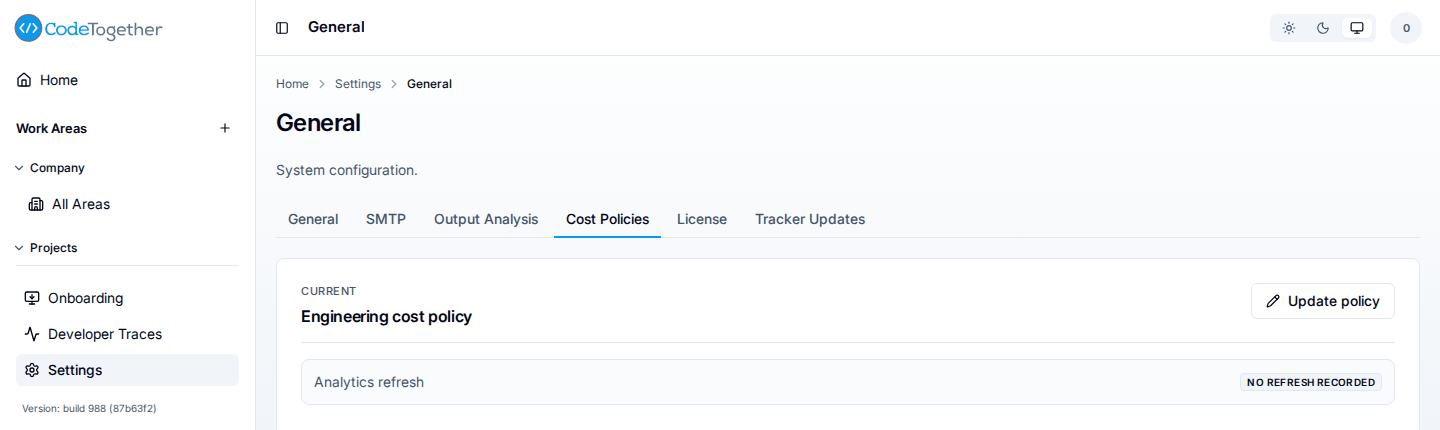
- Go to Settings > General > Cost Policies.
- Select Update policy. If no policy is configured yet, select Create policy instead.
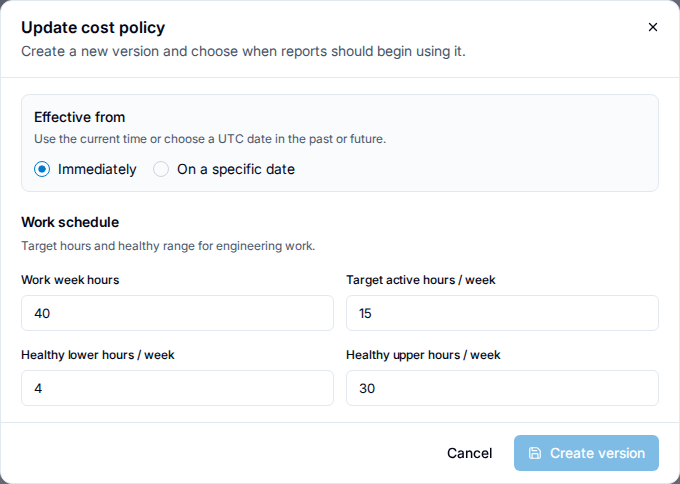
- Under Effective from, choose when the change takes effect: Immediately, or On a specific date.
- Under Work schedule, set Work week hours, Target active hours / week, Healthy lower hours / week, and Healthy upper hours / week.
- Select Create version.
2. Understand what changes
Editing does not overwrite the current values. It creates a new, immutable version and keeps every earlier version in the Policy versions history, so past reports stay traceable to the assumptions that produced them.
A version you create to take effect immediately or on a future date leaves reports for earlier dates untouched — they keep reading the version that was effective at the time.
A version you backdate to a past date is different: reports for the days between that date and the present recalculate under the new assumptions after analytics data refreshes. The dialog warns you when your chosen date falls before the current version's start, since that is the case that rewrites recent history rather than only steering it forward.

Reports select whichever version was effective for each date they cover. A report spanning several versions blends them by date rather than retroactively restating earlier days under the newest values.
After you create a version, CodeTogether AI refreshes the analytics data reports read from. Reports keep showing the prior version's figures for their dates until that refresh finishes — including for a backdated version, so a reader never sees a partially-recalculated blend: the numbers are either the old version's or, after the refresh completes, the new one's.
The Analytics refresh row at the top of the current policy card is where that refresh reports itself. It reads No refresh recorded until a version triggers one, Refreshing analytics data while one runs, Analytics data refreshed when reports can use the version, and Analytics refresh needs attention if it failed.
On-premises, while the refresh runs, every dashboard page carries a notice for readers: "We are refreshing your data. Some numbers may be incomplete until this finishes." SaaS does not report the refresh to readers, so the notice does not appear there.
Troubleshooting
The analytics refresh needs attention
The refresh that applies a new or edited version did not complete, and the Analytics refresh row on the current policy card says so. Reports keep reading the last successfully refreshed version until it does.
On-premises the same operation is called a rebuild, and a failed one also puts an Analytics rebuild failed link in the left navigation, in danger colour, for anyone who can retry it. It opens the Data / Maintenance settings area, where Retry analytics rebuild sits on the rebuild status banner, and it clears itself when the failure clears.
Contact support if it does not recover.
If this doesn't fix it
Contact support with all of the following. Tickets missing these take longer to resolve:
- The policy version you created or edited, and its effective date.
- Whether the analytics refresh for that version completed, is in progress, or needs attention.
- The report and date range where the numbers look wrong, and the value you expected.
- Your deployment kind and server version.
Related
- Is the investment paying off? — what these assumptions feed.
- Tune value points — aligning scoring to your priorities.
- Roles reference — who can edit tenant settings.