Work areas
A work area is a saved, named scope over your organization's development activity. It answers one question: of everything the platform captured, which slice does this view report on. Every dashboard and report in the portal renders inside a work area.
- Deployment: SaaS, On-premises
A work area is not a team and it is not a project, even though two of the templates are named after those things. It is a filter with its own access list.
Coverage and membership are independent
Two settings sound alike and do different jobs:
- Coverage is whose activity the work area reports on. It is set by the work area's template and scope configuration.
- Membership is who can open the work area. It is set by granting work area roles to users and groups.
Changing one never changes the other. Adding someone as a member does not pull their commits into the numbers, and covering someone's commits does not let them open the view. This is the single most common source of confusion about work areas, and most reports of missing or unexpected data trace back to it.
A person can appear in a work area's coverage without being a member, and a person can be a member of a work area that reports on nobody but other people.

Templates decide what a work area can cover
Every work area has one of five built-in templates. The portal labels a template Work Area type — in the New Work Area dialog and in the settings drawer — so the control to look for is named Type, not Template.
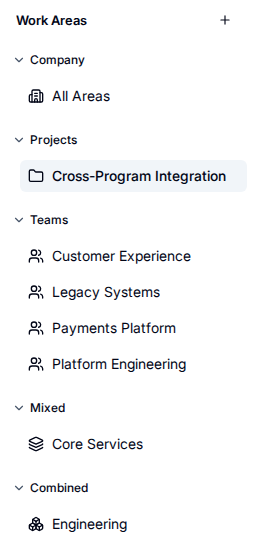
The company work area is provisioned with the organization; the other four are chosen when a work area is created. The template fixes the kind of coverage the work area accepts. The following table lists the templates:
| Template | Covers | You configure |
|---|---|---|
| Company | The whole organization | Nothing. Coverage is implicit |
| Project | Activity in a set of repositories | Repositories |
| Team | Activity by a set of people | Developers, selected by name or email |
| Mixed | Activity in those repositories by those people | Both repositories and developers |
| Combined | The union of other work areas | Child work areas |
None of these four is fixed once the work area exists: Work Area type can be changed from the work area's settings. Changing it empties the coverage already entered, because the new template accepts different fields, so have the replacement coverage to hand before you change it. The default company work area in the first row is the exception — its type is fixed. See Change a work area's template.
Mixed is an intersection and Combined is a union. A mixed work area reports only on activity that satisfies both conditions, so a commit made in a covered repository by someone outside the people list is excluded. A combined work area reports on everything any of its children report on.
The portal's Work Areas sidebar groups every work area by its template, so the template a work area was created from is readable without opening it.
Coverage limits
Each template carries its own caps, so a work area cannot grow past the size its shape is designed for. The following table lists the limits:
| Template | Maximum repositories | Maximum developers | Maximum child work areas |
|---|---|---|---|
| Company | Not applicable | Not applicable | Not applicable |
| Project | 50 | Not applicable | Not applicable |
| Team | Not applicable | 50 | Not applicable |
| Mixed | 50 | 100 | Not applicable |
| Combined | Not applicable | Not applicable | 20 |
Work areas migrated from an earlier version can exceed these caps. Those keep working, and can shrink, but an update must not grow a dimension that is already over its cap.
Every organization starts with a company work area
The platform provisions one default work area covering the whole company when the organization is created. It uses the Company template, it cannot be given explicit coverage, and it is the view that answers organization-wide questions.
Create further work areas when a group needs to look at a narrower slice, not because a team exists. A team with no separate reporting question does not need its own work area.
Combined work areas hold live references
A combined work area stores references to its children, not a copy of their coverage. When a child's repositories or people change, the combined work area reflects that on the next query without being edited. If two children overlap, with the same repository or the same committer covered by more than one child, the overlapping activity is still counted once: coverage resolves as a single query across all children, not as each child's totals added together.
Children must be ordinary work areas in the same organization. A combined work area cannot contain another combined work area, and it cannot contain the default company work area.
Repositories can be named two ways
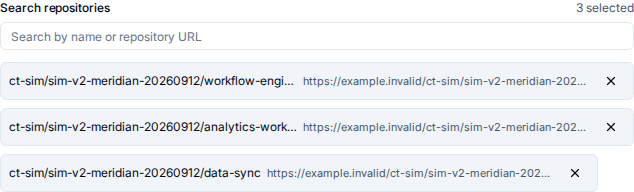
A project or mixed work area identifies repositories either by stable id or by a remote selector such as owner/repo. Selectors resolve to whatever repositories currently match at query time, so a repository that is re-cloned or re-registered stays covered without the work area being edited.
Either way, the work area's coverage list shows the resolved repository name with its remote URL beside it, so the two forms of identification read the same on screen. A stable id the platform cannot resolve to a repository is shown as the id, which is how you spot coverage pointing at a repository that no longer reports.
Related
- Create a work area — choosing a template and setting coverage.
- Work area templates reference — the exact coverage fields and caps per template.
- Roles reference — what each work area role can do.
- No activity appears for a developer — diagnosing coverage that excludes someone unexpectedly.