No activity appears for a developer
Use these steps to determine why one developer's activity is missing while others appear. Work through them in order. Each step states how to tell whether it was the cause.
- Deployment: SaaS, On-premises
- Role: Owner, Admin
Every screenshot on this page shows a sample dataset, so the developer names and figures in it are generated rather than real.
1. Confirm enough time has passed
Activity is processed asynchronously, and downstream rollups build after ingestion. A view can be empty simply because processing has not completed.
If the developer's setup finished recently, or the commits are very recent, wait and check again before treating this as a fault. If activity is missing well after other developers' activity from the same period appears, continue.
2. Confirm the workstation is set up
Ask the developer to run the status command and send you the output:
aitrax setup check
If system reports as not configured, that is the cause. See
Setup reports not configured. If it reports as
configured, continue.
3. Check whether they are capturing at all
Open the work area's Tracking tab. Its Developer Tracking grid lists one row per developer and one column per tool, over the last 4 weeks, and states its own legend: a check mark means the tool was used in the last 7 days, a clock means 1-4 weeks ago, and an empty cell means not used in the last 4 weeks. Developers and tools with no activity in the window are not listed at all.
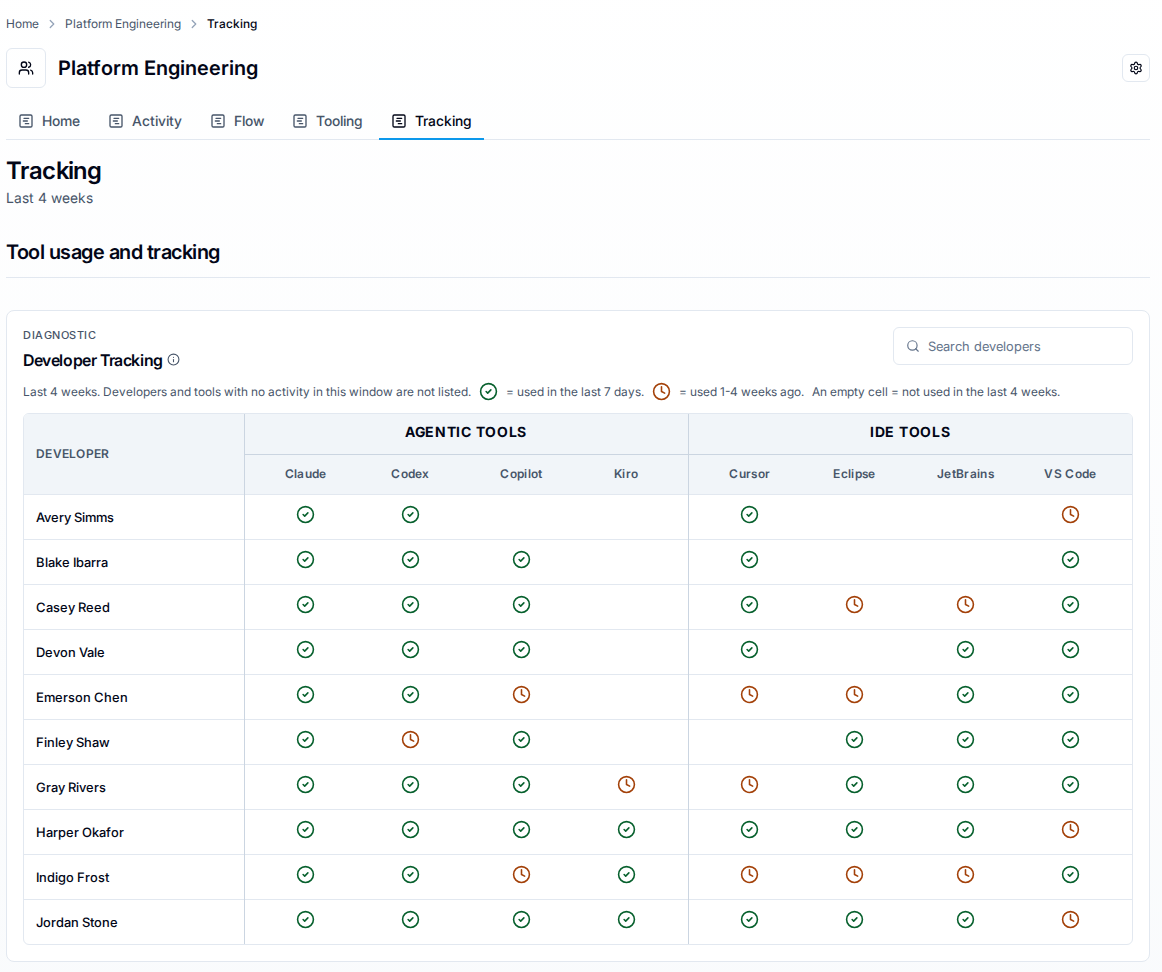
A developer who is on the grid with coverage for some tools and not others is reaching the platform, and the gap is per-tool setup: send them to Verify your installation, and you are done here.
Absence from the grid is not by itself a verdict. The grid reads one work area over a fixed trailing 4 weeks and has no range control of its own, so a developer can also be missing because the work area's filter excludes them (step 4) or because their last activity is older than 4 weeks. Continue through the remaining steps before concluding that nothing is arriving at all.
Tracking is visible to a work area's Owners and Admins, which an organization Owner or Admin inherits on every work area. If you cannot see the tab, ask a work area Owner to check it for you, or use the Developer Traces roster instead — see Confirm data is being collected.
4. Confirm the work area filter includes them
A work area is a named filter. If its filter does not select this developer's repositories or developer identity, their activity exists but this view does not show it.
Compare the same period in a work area known to include them, or with the filter cleared. If activity appears elsewhere, the filter is the cause. If not, continue.
5. Confirm their commits are attributed to their developer identity
Activity is attributed to developer identities, inferred from the Git commit email, the IDE identity, or the AI agent acting on the developer's behalf. A developer committing under an email the platform has not linked to their portal user produces activity attributed to an unlinked developer identity, so their personal view looks empty even though the data arrived.
Compare the Git author email on a commit that should have been captured against the developer identities listed at Settings > Developers. If they differ, that is the cause: link the identities at Settings > Developers so the activity is combined. Confirming an identity link queues a rebuild of your analytics.
If this doesn't fix it
Contact support with all of the following:
- Deployment kind and server version.
- The developer's operating system and the output of
aitrax version. - The complete output of
aitrax setup checkfrom the developer's workstation. - The developer's audit log from
~/.codetogether/aitrax.jsonl. - The work area name and its filter, and whether activity appears with the filter cleared.
- The Git author email on a commit that should have been captured.
- The date and time range you expected activity in.
Related
- Members and developers — why attribution and access are separate.
- Validate data with developer traces — drilling into what was captured for a developer.