GitLab SSO Setup (OAuth/OIDC-style configuration)
This guide explains how to create and configure a GitLab OAuth application for CodeTogether SSO.
Audience
SSO/IdP Administrator
Create the GitLab OAuth application and provide required values.
CodeTogether System Administrator
Apply values in cthq.properties, restart services, and validate login.
Prerequisites
- Access to GitLab (self-managed or GitLab.com) with permission to create OAuth applications
- Access to your CodeTogether environment configuration (QA/Staging/Prod)
1) Create OAuth application in GitLab
- Sign in to GitLab
- Go to User Settings → Applications
(On some deployments: Admin Area → Applications) - Create a new application with:
- Name: e.g.
CodeTogether SSO - Redirect URI:
https://<your-domain>/api/v1/auth/sso/success/insights - Scopes: at least
read_user(andopenid profile emailif your instance supports OIDC scopes)
- Name: e.g.
- Save/Create the application
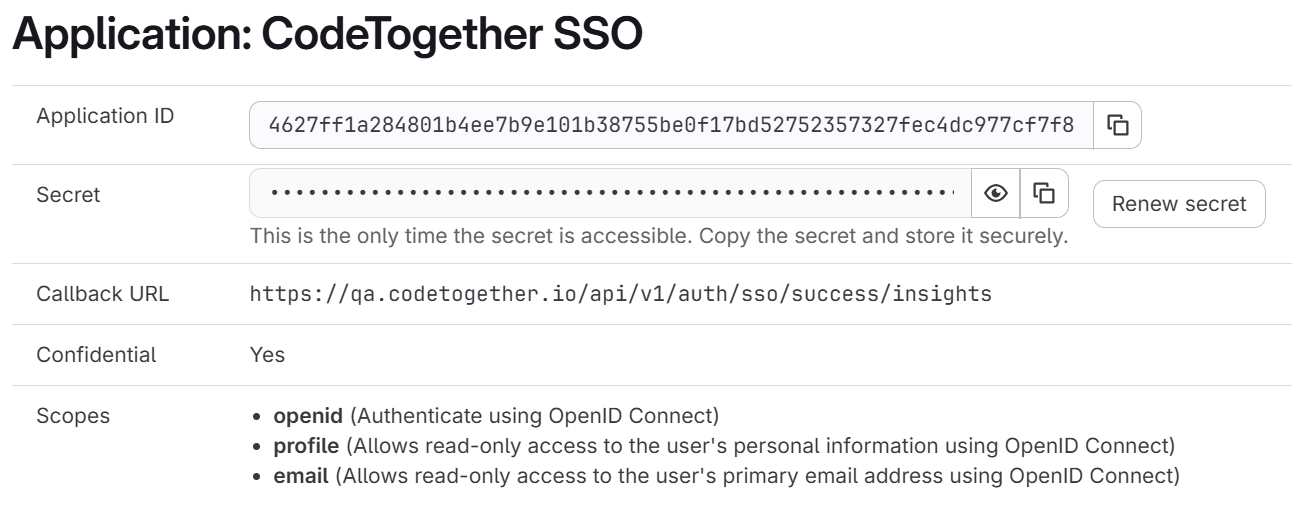
2) Collect required values
From the application page, copy:
- Application ID / Client ID →
hq.sso.client.id - Secret →
hq.sso.client.secret
danger
Copy/store the client secret securely when shown. If lost, regenerate a new secret.
3) Confirm redirect URI
Verify the redirect URI in GitLab is exactly:
https://<your-domain>/api/v1/auth/sso/success/insights
Must match exactly (scheme, host, and path).
4) Configure CodeTogether (cthq.properties)
hq.sso.provider=gitlab
hq.sso.label=GitLab
hq.sso.client.id=<GITLAB_CLIENT_ID>
hq.sso.client.secret=<GITLAB_CLIENT_SECRET>
hq.sso.client.issuer.url=https://<your-gitlab-domain>
hq.sso.redirect.uri=https://<your-domain>/api/v1/auth/sso/success/insights
hq.sso.scope=openid,profile,email
5) Deploy and restart
- Apply configuration changes
- Restart backend services so SSO settings are reloaded
6) Validation checklist
- OAuth application exists in GitLab
- Redirect URI matches exactly in GitLab and CodeTogether
client.idandclient.secretare valid- If using issuer mode, issuer URL is correct for your GitLab domain
- Login flow redirects to GitLab and returns successfully to:
/api/v1/auth/sso/success/insights